
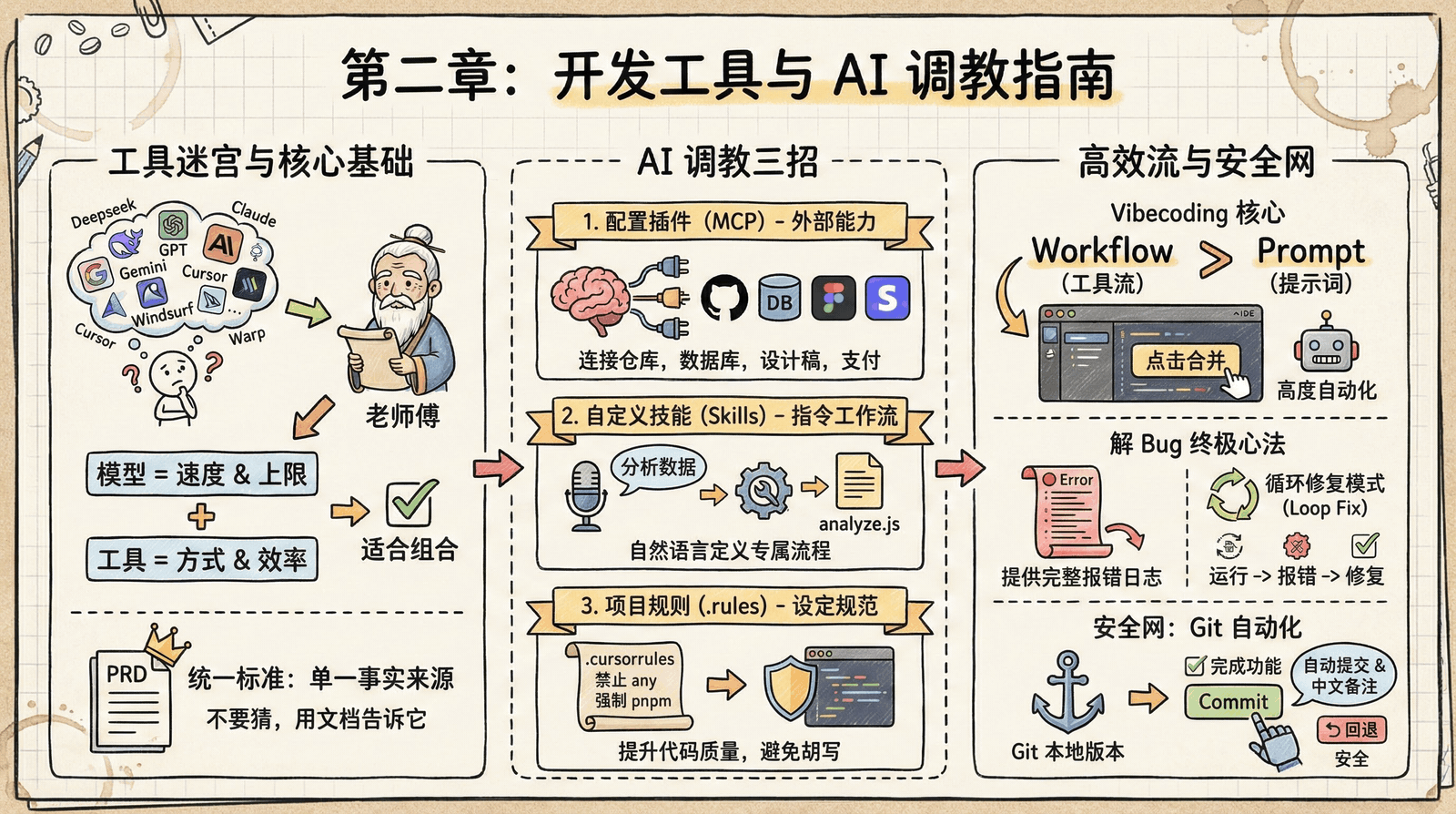
Chapter 2: AI User Guide
🎯 Claude Code Feature Overview
Want a complete overview of what Claude Code can do? Visit cclog.vibevibe.cn for a full breakdown of features from v0.2 to v2.1, covering 220+ versions and 1000+ updates, including AI models, multi-Agent collaboration, the MCP ecosystem, terminal experience, security sandboxes, and every other core capability.
Preface
In the previous chapter, you learned the difference between models and tools, and finished setting up your development environment. Now, let's learn how to get AI to work better for you.
The Economics of AI Programming
The experienced mentor tells you there's a frequently overlooked reality in AI programming: Tokens are money. Every time you ask AI to read project files, search code, or generate a response, you're spending real money.
There's only one core principle: the larger the context, the higher the cost. Reading an entire project vs. reading just one file is an order-of-magnitude difference. But more importantly—precise context doesn't just save money, it also makes the output more accurate.
Optimizing prompts isn't about "polishing your wording"—it's about reducing the scope of context the AI needs to read. Specifying file paths is better than vague descriptions, defining the feature scope is more focused than broadly saying "there's a problem with the project," remove pleasantries, don't assign an expert role, and just state the task directly.
2.1 The Economics of AI Programming explains cost optimization strategies in detail.
The VibeCoding Workflow
You notice that sometimes AI outputs are all over the place, or it confidently says things that make no sense. You'll also run into cases where the AI doesn't know the answer, but makes something up anyway.
The experienced mentor tells you that real mastery doesn't come from configuration, but from the art of communication. Give the AI an "out" and tell it: "If you're not sure, say so clearly and wait for my confirmation instead of making something up."
Before, you just improvised as you went and had the AI start coding right away, but that often led to rework. The standard workflow the mentor teaches has only five steps: first explore the project structure, then plan the implementation steps, then code, then test and verify, and finally commit. It sounds obvious, but after following it a few times, you realize it really does improve efficiency—because you won't get halfway through writing something only to discover the file was already implemented.
You come to deeply realize: the core of Vibecoding is not just Prompt, but Workflow.
2.2 The VibeCoding Workflow explains prompt principles and the standard development process in detail.
Version Control with Git
As you eagerly get ready to have AI make major changes to your code, the experienced mentor suddenly stops your hand. He tells you that AI programming is very aggressive, and it might break three existing features just to fix one Bug. So you must configure Git properly and establish frequent local version records.
"Whenever you finish developing an independent feature, or fix a Bug and verify that it works, automatically run git commit to commit the code and generate a concise Chinese commit message."
From then on, your development workflow becomes: AI finishes writing a feature → automatic snapshot. If the code breaks, you can roll back at any time. We'll cover detailed .gitignore configuration in a later chapter.
Configuration Tips
Besides choosing the right tools, the experienced mentor also teaches you three tricks to make AI much more useful and solve problems like poor memory and writing nonsense:
Project rules: Create a file like .iderules in the project root directory, and write rules such as "Do not use the any type" and "Always use pnpm." From then on, every time AI writes code, it will first refer to this project standard, and the quality of the generated code instantly improves.
Custom skills: Create or install Skills, and use natural language to define custom instructions, such as "Whenever I say 'analyze data,' automatically run the analysis script." This is equivalent to defining a standard operating procedure for AI.
Grant capabilities: Configure MCP and plugins so AI can connect to GitHub repositories to view code, connect to databases to query data, and read Figma design files. You don't need to understand the underlying principles—just do some simple configuration, and AI gains the ability to operate external tools.
2.3 MCP, Plugins, and Skills and 2.4 Project Rule Configuration explain these configuration techniques in detail.
Debugging Mindset
Before wrapping up the preface, the experienced mentor also passes on a debugging mindset. He says: "With AI, don't panic when you run into errors. But if you want AI to help you, you need to learn how to ask for help the right way."
First, provide the complete error log. Beginners often get intimidated when they see a screen full of red error messages, so they only copy the last line. But AI is like a doctor—it needs to see the full symptoms to make an accurate diagnosis. You should select, copy, and send those longest, most complicated-looking red error messages to the AI exactly as they are.
Second, use an iterative fix loop. If the AI doesn't fix it the first time, don't give up. Describe the results after trying its suggestion: "I changed it the way you said, but now there's a new error..." and let the AI keep trying. Most Bugs take 2-3 rounds of iteration to resolve.
2.5 Efficient Debugging Mindset will teach you this complete debugging method.
Additional Knowledge
The experienced mentor tells you that once you've mastered the core workflow, you can also explore multi-agent systems: have multiple AIs collaborate, with one writing code and another reviewing it; one writing tests and another writing documentation. They can work in parallel to improve efficiency, or in sequence to ensure quality. This part is already covered in detail in 2.2 The VibeCoding Workflow.
For now, focus on mastering the core workflow, one step at a time.
Hands-on Practice
I know you're eager, but hold on for just a bit—after reading Chapter 3 on PRD and document-driven development, this will make even more sense. Then pick a feature you recently wrote or want to write, and tell the AI: "First explore the project structure, then plan the implementation steps, then code, and commit the code after each completed step." Follow its rhythm, and you'll discover that the core of Vibecoding is Workflow, not Prompt!