
Chapter 12: Serverless Deployment and CI/CD Automation
Preface
Xiaoming has already pushed his "Personal Douban" code to GitHub, and he’s collaborated with friends a few times through branches and PRs. Everything seemed to be going smoothly—until a friend sent him a message: "The link you showed me last time with Tunnel doesn’t work anymore. Can you make one that stays available? I want to send it to my girlfriend."
Xiaoming froze for a moment. The link temporarily shared with Cloudflare Tunnel in Chapter 10 stopped working as soon as the terminal was closed. What he needs is a permanently online address—something anyone can open, anytime.
That’s exactly the problem "deployment" is meant to solve.
Zero-cost deployment
The seasoned expert recommends a zero-cost starter setup: choose a deployment platform + a database hosting service.
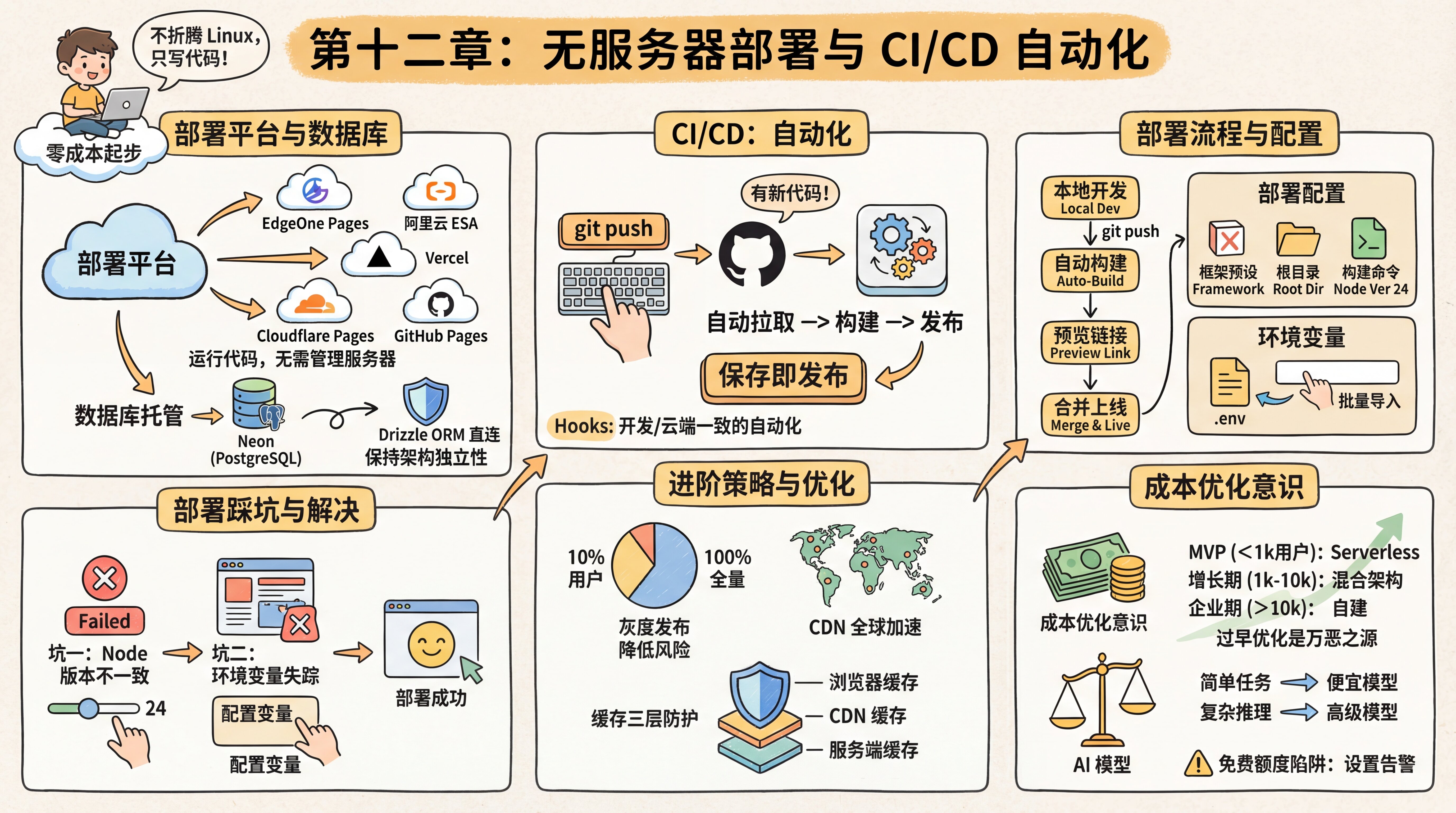
A deployment platform is responsible for running your frontend and backend code, providing a Serverless environment. Note that Serverless does not mean there are no servers—it means you don’t have to manage the servers. You just write code, and the platform takes care of scaling and maintenance for you.
Mainstream deployment platforms include:
- Tencent Cloud EdgeOne Pages: accessible in mainland China, built on Tencent’s global edge network, supports automatic deployment after connecting to GitHub, and works very well with Next.js
- Alibaba Cloud ESA Functions and Pages: Alibaba Cloud’s all-in-one full-stack development platform, deeply integrated with Git workflows, with fast domestic access speeds
- Vercel: the official deployment platform for Next.js, with an excellent developer experience, but slower access in mainland China; better suited for overseas users or projects with custom domains
- Cloudflare Pages: accelerated by a global CDN, generous free tier, and supports edge functions
- GitHub Pages: the simplest static site hosting option, ideal for pure frontend projects
部署平台对比
选择适合你的部署平台
Database hosting is responsible for storing your data. The seasoned expert recommends Neon—a cloud service focused specifically on PostgreSQL itself, offering a serverless architecture with automatic scaling up and down on demand. Most importantly, it is standard PostgreSQL. You connect to it through Drizzle ORM using a standard connection string, without any vendor lock-in. That way, if you ever want to switch database providers, you only need to change DATABASE_URL. This is what it means to keep your architecture independent.
If you need more backend features (such as Auth, Storage, or Realtime subscriptions), you can also consider Supabase. At its core, it’s basically cloud-hosted PostgreSQL plus a set of backend services. But the seasoned expert reminds you to connect directly to the database with Drizzle ORM whenever possible, instead of relying heavily on Supabase’s proprietary JS SDK, so you can keep migration flexibility.
CI/CD automation
The seasoned expert also mentioned a term that sounds pretty advanced: CI/CD (Continuous Integration / Continuous Deployment). It may sound complicated, but in modern development workflows, it really just means "automation".
In the past, deploying a website meant: manual build -> upload to server -> SSH into server -> restart service. Now the process looks like this:
- You run
git pushlocally to push your code to GitHub. - GitHub automatically notifies the deployment platform: "Hey, there’s new code!"
- The deployment platform receives the signal, automatically pulls the latest code, installs dependencies, runs the build, and publishes it.
You don’t need to understand complicated ops commands anymore—save and publish.
CI/CD turns deployment into "save and publish." The seasoned expert tells you that this idea of automatically triggering actions when code changes is exactly the same concept as the Hooks we mentioned during development. Locally, Hooks automatically run tests and formatting; in the cloud, CI/CD automatically runs builds and deployments. Together, they form a complete automation loop.
Deployment lifecycle: A complete deployment flow includes several stages—you write code locally, pushing to GitHub automatically triggers a build, and after the build succeeds a preview link is generated (on domestic platforms, it’s usually valid for 3 hours). Once you confirm everything looks good, merging into the main branch puts it officially online. After the number of deployment records exceeds a certain limit, older deployments are marked as invalid, which helps save storage space.
Deployment configuration
Before you start deploying, the seasoned expert tells you that you should first understand a few core configuration parameters. Modern deployment platforms can automatically detect many project settings, but understanding these parameters helps you troubleshoot when something goes wrong.
Build settings:
- Framework preset: choose the framework you’re using (such as Next.js), and the platform will automatically fill in recommended settings
- Root directory: where the code is located in the repository, usually the repository root by default,
./ - Build command: usually
npm run buildorpnpm build - Output directory: where build artifacts are stored; for Next.js this is usually
.nextorout - Node version: the platform comes with multiple Node versions preinstalled (such as 18, 20, 22, 24); this tutorial uses major version 24
Environment variables: these need to be configured separately after deployment. Domestic platforms usually support bulk import—you can directly paste the contents of your .env file, and the platform will automatically recognize them. Note that changes to environment variables only take effect for new deployments and do not affect existing ones.
Deployment pitfalls
You’ve learned how to connect a GitHub project to a deployment platform, clicked the "Deploy" button, and the first build has started.
Pitfall 1: Inconsistent Node.js versions
A red Failed hits you like a blow to the head. Checking the logs, you find that the problem is an outdated Node version. The deployment platform’s default Node version may be relatively old, while your Next.js project requires a newer one. You need to go into the platform settings, change the Node.js Version to match your local environment (24 in this tutorial), and then redeploy.
Pitfall 2: Missing environment variables
After fixing the version, the build succeeds—but the website throws errors everywhere when you visit it. Suddenly, you remember something from Chapter 6: the .env file was blocked by .gitignore! GitHub doesn’t have your database password or API Key at all. You need to go to the platform’s "Environment Variables" page and copy everything from your local .env file into it one by one.
Domestic platforms usually support bulk import—you can simply paste the full contents of the .env file, and the platform will detect them automatically.
Once the variables are configured, you visit the site again full of anticipation, and finally the page displays correctly. Because you’ve been using a cloud database all along, both your code and data are already there—the deployment is just changing where the code runs.
Deployment successful
Once everything is configured properly, the deployment platform generates an access link for you. You excitedly click it, and the website is now running on the public internet—you’ve finally got the shareable link you wanted to send to your friends.
Gradual rollout—reducing risk
After the deployment succeeds, the seasoned expert mentions a more advanced strategy: "If your product has a large number of users, pushing new features directly is risky. If there’s a serious bug, it affects everyone."
The idea behind a gradual rollout is this: first push the new version to 10% of users, observe for a few days, then expand to 50%, and finally roll it out to everyone. It’s like offering samples to a small group first, then promoting it on a larger scale after confirming everything is fine.
This allows you to cut losses quickly if problems appear, instead of exposing all users to risk at once. The good news is that some deployment platforms support this feature, and you can even let AI help you configure it.
Personal projects don’t need this level of complexity yet, but understanding the concept helps you understand how large companies work—why sometimes you get access to a new feature and sometimes you don’t: you may be in different rollout batches.
Platform automatic optimization
After deployment succeeds, the seasoned expert gives you some good news: these platforms have already done a lot of performance optimization for you.
For example, images are automatically compressed into more efficient formats, code is automatically split into smaller chunks for on-demand loading, and static assets are distributed across global acceleration nodes. You don’t need to configure any of this yourself—the platform handles it by default.
Of course, if your product grows to a large user base, these default optimizations may not be enough. At that point, you can start considering more advanced optimization strategies. But in the early stage, the platform’s default settings are already more than good enough.
CDN
The seasoned expert also brings up an important concept in passing: CDN (Content Delivery Network). After you deploy your website to the public internet, you may notice something—access is fast in mainland China, but slower overseas. That’s because physical distance limits transmission speed; when data has to travel halfway around the world, it takes time.
The principle behind a CDN is to deploy "cache servers" around the world. When a user visits your website, the CDN automatically returns content from the server closest to that user, instead of requesting it from the origin server every time. It’s like opening branch locations everywhere, so users can visit the nearest branch instead of going to headquarters.
Modern deployment platforms (EdgeOne, ESA, Vercel, Cloudflare, and so on) all come with built-in CDN support, so you don’t need any extra configuration. Once you understand this principle, you’ll know why websites can be accessed quickly around the globe.
The three layers of cache protection
The seasoned expert says, "Caching is everywhere, and it makes websites faster." You’ll encounter three kinds of cache:
- Browser cache: previously visited resources are stored locally, so they don’t need to be downloaded again next time. You already experienced this in Chapter 4—you changed code, refreshed the page, and still saw the old version because it was cached.
- CDN cache: the global edge-node cache we just discussed, closest to the user.
- Server-side cache: the server caches computation results or database query results in memory to avoid doing the same work repeatedly. You may have noticed that the first time you open a page it’s slower, but opening it again afterward is much faster—even if you cleared the browser cache. That’s often server-side caching at work.
Most caching is automatic. The core idea of caching is simple: store commonly used things so you can use them directly next time. Sometimes a website has been updated but users still can’t see the changes—that may just mean the cache hasn’t been refreshed. Clearing the cache or doing a hard refresh (Ctrl+Shift+R) usually fixes it.
Cost optimization
After your product has been online for a while, you open the billing page and the numbers make your heart race. The seasoned expert tells you that this is when you need to build an awareness of cost optimization.
When it comes to deployment decisions, the seasoned expert says you should think in stages. In the MVP stage (<1000 users), start with Serverless at zero cost and don’t optimize too early. In the growth stage (1000-10000 users), evaluate a hybrid architecture, and only consider self-hosting if costs are growing too quickly. In the enterprise stage (>10000 users), you only need self-managed servers for compliance or performance optimization. Premature optimization is the root of all evil—don’t worry about stage three problems while you’re still in stage one.
AI model costs are also worth optimizing. Use cheaper domestic models (such as GLM, DeepSeek) for simple tasks, and use Claude for complex reasoning. You can add a decision layer in your code: send simple translation and summarization requests to cheaper models, and only send requests requiring deep reasoning to Claude—this is called "intelligent routing." One AI application reduced API costs by 80% through intelligent routing (70% GLM + 30% Claude). The key is matching task complexity with model capability—don’t use a cannon to kill a mosquito.
The seasoned expert also reminds you to watch out for the free tier trap: the free quotas on many platforms are only enough for testing. Once you have real users, costs can grow exponentially. Be sure to set billing alerts (for example, "send an email reminder when it exceeds ¥70"), check usage regularly, and stay on top of things. Free tiers are for trying things out, not for running production workloads long term.
As for SRE-related technical practices such as operations monitoring and log analysis, we’ll cover those in detail later in the cloud server operations section.
Learning path for this chapter
- Deploy to EdgeOne Pages → Complete your first deployment step by step and get a public link
- Deploy to Vercel-like platforms → Explore more platform options and find the one that suits you best
- CI/CD and automation → Push to deploy and let automation take over repetitive work
- Operations basics and cost optimization → Who watches it after launch, and how to control costs
Deployment in the AI coding era: Tell AI your target platform, and it will help you complete the configuration and deployment.
Previous chapter: Chapter 11: Git Version Control and Cross-platform Collaboration
Next chapter: Chapter 13: Domain Names, DNS, and HTTPS