
Chapter 3: Product Thinking and Documentation-Driven Development
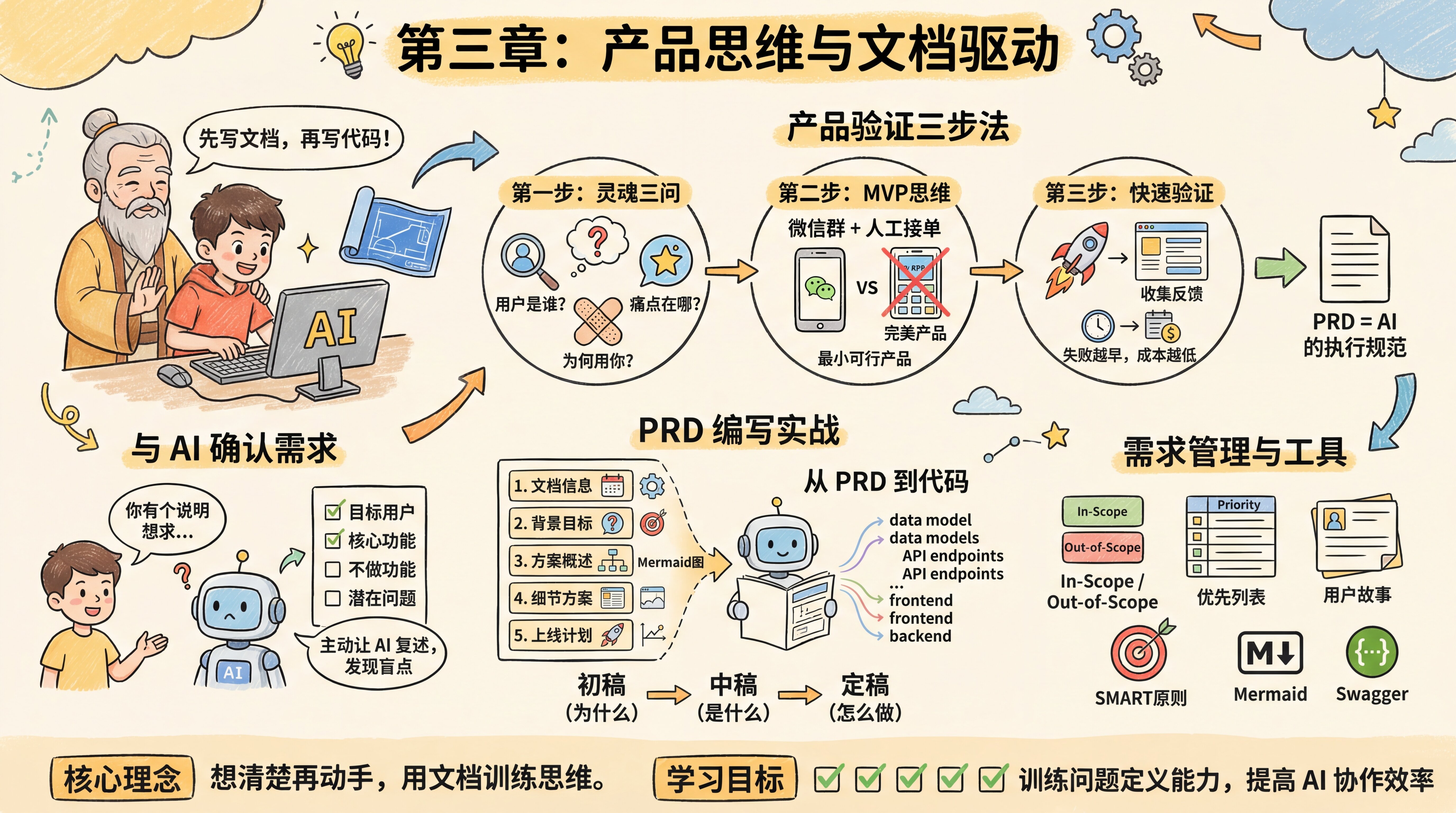
Introduction: Why write documentation before writing code?
Before letting AI write code, the seasoned expert stops your hand from rushing ahead. He tells you, before writing code, write documentation first. Without a blueprint, AI can easily become like a runaway horse, and the code it generates will often lack structure, resulting in a pile of features that no one can understand or maintain.
If you already have a clear idea, or just want to build a small tool or validate a technical approach, and don’t need to go through the full product validation process, you can jump directly to 3.2 Confirm Requirements with AI or 3.3 Hands-On PRD Writing.
The Three-Step Product Validation Method
The seasoned expert says: "Before writing any code, first do the three-step product validation method:
Step 1: Three essential questions. Who are the users? What pain point are you solving? Why would they choose you? These three questions may seem simple, but many people can’t answer them. If your user is 'everyone,' that means you have no user. If the pain point is 'I think this is needed,' then it’s not a real pain point. If your answer to 'why choose you' is 'because we have the best technology,' users simply don’t care.
Step 2: MVP thinking. What is the simplest version that can validate the hypothesis? Don’t try to build a perfect product all at once. Start with a minimum viable product (MVP) and quickly validate the core assumption. For example, if you want to build a food delivery app, the MVP might just be a WeChat group + manual order handling, not a full app.
Step 3: Rapid validation. Validate assumptions at the lowest possible cost. You can start by serving users manually, or build a simple landing page to collect user feedback. Remember: the earlier you fail, the lower the cost.
A PRD is AI’s execution spec. Once you’ve thought through the three steps above, the PRD is what translates that thinking into a structured document AI can understand.
3.1 Hands-On Idea Validation 🔴 - Master the three-step product validation method and avoid building something nobody wants
Confirm Requirements with AI
You may have noticed that AI output can sometimes be all over the place, or confidently say things that make no sense. Worse, AI won’t proactively ask questions—when you give it vague requirements, it makes assumptions based on common patterns in its training data and then starts generating code right away. If those assumptions are wrong, you’ll pay a much higher communication cost in later iterations to fix them.
The seasoned expert tells you that the core of proactive confirmation is this: don’t wait for AI to ask you questions—make AI clearly state its understanding.
After every requirement discussion, use a confirmation template to have AI restate: who the target users are, what the core features are, which features are out of scope, and what potential issues might exist. This helps you catch misunderstandings before writing code, instead of discovering them only after the code is already running.
3.2 Confirm Requirements with AI 🔴 - Proactively get AI to confirm its understanding and uncover blind spots
Hands-On PRD Writing
In traditional development, a PRD is written for the team; but in AI-driven development, the more important role of a PRD is to give AI complete context so it doesn’t have to keep guessing your intent.
The seasoned expert tells you that a complete PRD contains five core sections:
Part 1: Document information. Record the current document version, what stage it is in, who the key stakeholders are, and the iteration history of versions (such as draft, mid-version, final version).
Part 2: Background and objectives. Answer the project overview, core problem, user stories, and project goals.
Part 3: Solution overview. Use Mermaid diagrams to show the core business flow, feature flow, and information architecture.
Part 4: Detailed solution. Page prototypes and interaction notes, edge case handling, and non-functional requirements.
Part 5: Launch plan. Timeline and gradual rollout strategy.
The most important thing is structure + visualization. With this "single source of truth," AI output becomes much more stable, and requirement explosion becomes much less likely.
The seasoned expert shows you an enterprise-grade PRD template that clearly lays out the iteration process from initial draft to final version.
Internal review version (initial draft): Focus on explaining the requirement background, objectives, and core value. At this stage, it doesn’t need to be too detailed—you just need to clearly explain "why we’re doing this."
Project review version (mid-version): Add the core business flow, feature flow diagrams, and prototype interaction notes. At this stage, development, design, and testing should all be able to understand what you’re building.
Final version before development (final draft): Merge in the final UI designs and add edge cases, analytics event tracking plans, and the launch plan. At this stage, the document should be detailed enough that development can follow it directly.
The seasoned expert emphasizes: "A PRD isn’t created in one shot—it’s built through iteration. In the early version, think clearly about 'why'; in the middle version, think clearly about 'what'; in the final version, think clearly about 'how.' Every step includes review and revision so you don’t discover major problems only at the very end."
Beyond iterative thinking, requirement management is also a core skill for product managers.
3.3 Hands-On PRD Writing 🔴 - Complete template + detail→code cause-and-effect + visualization techniques
From PRD to Code
The seasoned expert tells you that understanding how AI "reads" and executes a PRD will help you write more effective documentation. AI does not "fill in the blanks" for vague areas—it interprets things literally. If a PRD is ambiguous, AI will either guess (and may guess wrong) or stop and ask questions (which adds more conversation turns).
Once you give the PRD to AI, it will extract key information, build data models, design API interfaces, and generate frontend and backend code. Every detail in the PRD affects the quality of the final code.
3.4 From PRD to Code 🟡 - Understand how AI "reads" and the cause-and-effect relationship from PRD→code
Requirements Management and Tools
While writing a PRD, you also learned several practical requirement management techniques:
Requirement scope management. Clearly define "In-Scope" and "Out-of-Scope" to effectively manage team expectations and prevent scope creep.
Requirement prioritization. Break requirements down into specific requirement items, and use a table to list requirement ID, module, description, priority, and status.
User stories. Describe requirements in the format: "As a <role>, I want to <complete a task>, so that <a certain value can be achieved>."
SMART goal setting. Project goals should follow the SMART principles—specific, measurable, achievable, relevant, and time-bound.
In addition, you also learned about Markdown (.md) and Mermaid. Markdown is used to write neatly formatted text, and Mermaid is used to draw flowcharts through text-based code. The seasoned expert says that when you provide these documents to AI, the accuracy of the code it generates improves significantly.
The seasoned expert adds: "Writing a PRD isn’t formalism—it’s about training your ability to define problems. Many people go straight to AI and say, 'help me build a feature,' and end up revising it over and over. But if you first clearly define the goal, users, business scenarios, and interaction logic, AI often gets it right in one go. The difference lies in thinking it through."
Finally, the seasoned expert also briefly mentions Swagger. Later, when projects become more complex, using Swagger to automatically generate API documentation can more efficiently ensure that the documentation stays aligned with the code implementation.
And one more thing—remember to have AI keep the documentation up to date at all times.
Next step: For detailed guidance on writing project documentation, please refer to the "Project Documentation README.md" section in Chapter 4: Development Fundamentals and Tech Stack.
Learning Objectives
After completing this chapter, you will be able to:
- ✅ Master the checklist of details that must be confirmed when discussing requirements with AI
- ✅ Use the three-step product validation method to judge whether an idea is worth building
- ✅ Use a standard template to write AI-friendly PRDs
- ✅ Understand which details affect the quality of code generated by AI
- ✅ Train your problem-definition skills and improve collaboration efficiency with AI
Hands-On Practice
Now, take a feature idea you’ve been wanting to build recently, and on the web, go through the checklist from 3.2 with AI one item at a time. After confirming everything, use the template in 3.3 to have AI generate the first draft of the PRD.
You’ll discover this: the clearer your thinking, the more accurate AI’s writing will be.
Core Concept
"Think it through before you start, and use documentation to train your thinking."
This chapter emphasizes that in the AI era, the ability to define problems is more important than the ability to implement code. A PRD is not empty formalism, but an expression of product thinking—from "why we’re doing it" to "what it is" to "how to do it," each step must be thought through clearly. With a structured PRD as the "single source of truth," AI can become an efficient execution partner instead of a guesser.
Previous Chapter: Chapter 2: AI User Guide
Next Chapter: Chapter 4: Development Basics You Must Know