
Chapter 6: Data Persistence and Databases
Preface
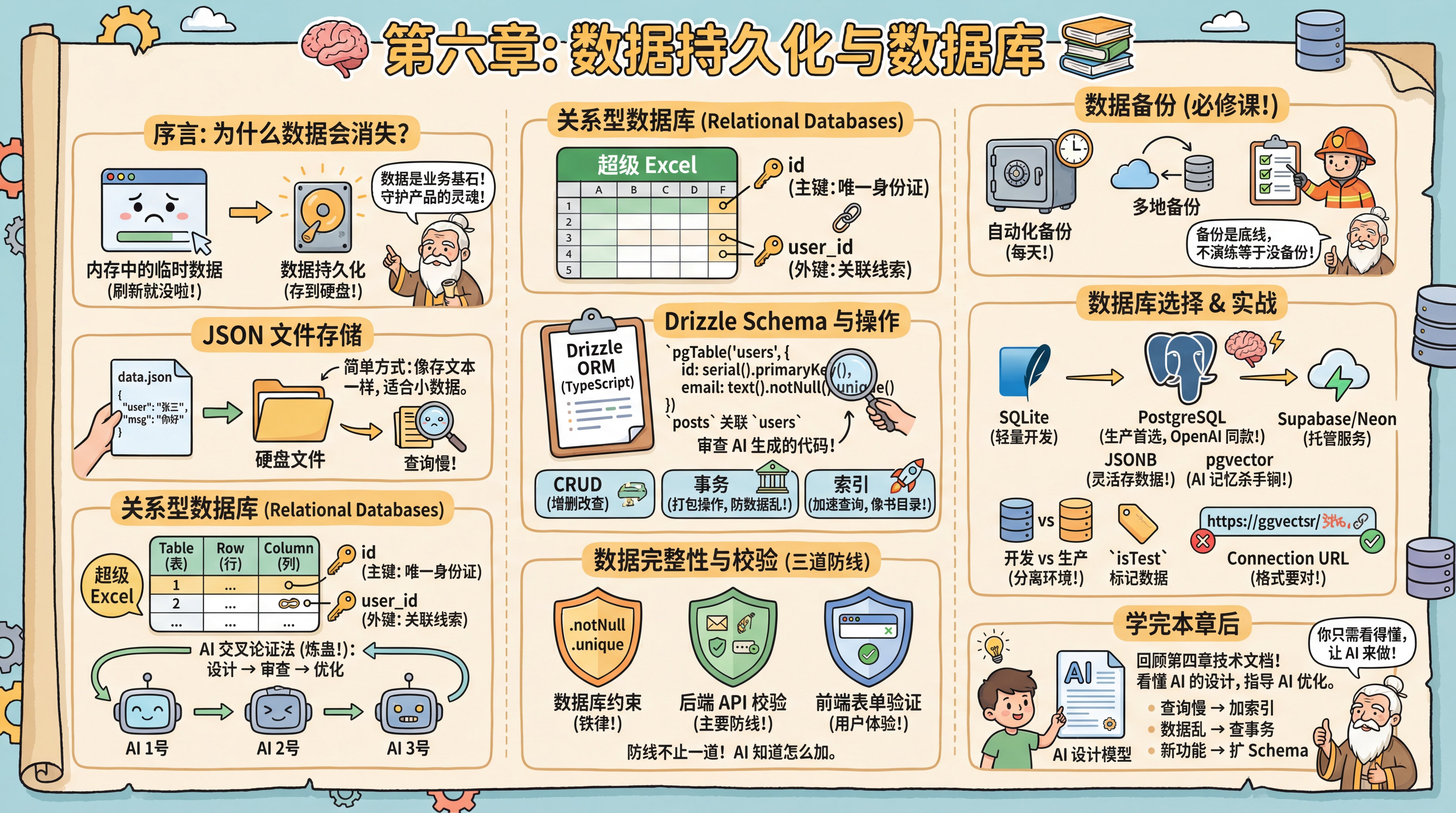
Your interface is looking polished, but you've hit an awkward problem: every time you refresh the page, the forms you filled out and the conversations you generated vanish into thin air.
The master explains that this happens because browser data defaults to temporary memory storage. To keep data alive after closing or refreshing the page, you need data persistence.
He reminds you sternly: Data is the foundation of all business. Frontend code can be rewritten, ugly UI can be reskinned—but if user data in your database is lost or corrupted, your product is finished. This is why backend development often demands more rigor than frontend work—you're guarding the soul of the product.
JSON File Storage
Persistence doesn't always require complex software right away. The simplest approach leverages the JSON format you learned from configuration files, storing data as .json files. Each chat record or user profile is essentially just text. Save it to a file on disk, read it back later, and you're done. This instantly reveals the essence of "databases"—nothing more than efficiently reading and writing files on disk.
Relational Databases
While JSON files are simple, they become painfully slow when you need to find "all users living in Beijing older than 20"—you'd have to scan the entire file. Enter Relational Databases. "Relation" doesn't mean personal relationships; it refers to tables connected through shared fields—a Users table linked to an Orders table via user_id, for example. The master asks you to picture it as a supercharged Excel, grasping just a few key concepts:
- Table: An Excel sheet, like a
Userstable. - Row: One line in the table, representing a specific record (e.g., user Zhang San).
- Column: The headers defining what attributes data has (name, age, email).
- Primary Key: A unique ID for each row (usually
id), absolutely non-repeatable. - Foreign Key: Clues linking to other tables. Recording a
user_idin anOrderstable lets you trace which user placed the order.
How do you judge AI-designed table structures? Beginners often struggle to spot schema flaws at a glance. The master teaches you the "AI Cross-Validation Method" (colloquially "refining the poison"): have AI #1 design your schema, then feed that code to AI #2 or AI #3, asking: "As a senior database architect, based on my PRD and actual business scenarios, is this design sound? What potential performance pitfalls or logical gaps exist?" After two rounds of this "left-right sparring," you'll typically arrive at a robust database model.
Drizzle Schema
SQL is the standard language for database operations; this tutorial uses Drizzle ORM. ORMs let you manipulate databases with familiar TypeScript code instead of handwritten SQL. Drizzle uses TypeScript to define schemas—table structures, columns, and types—which AI generates automatically from PRD documents.
For example, if the PRD states "one user can publish multiple articles," AI will add a posts field to the User table and an authorId foreign key to the Post table. Your job is reviewing whether AI's generated code is correct.
The master says: "Database design hinges on understanding business relationships. AI handles technical implementation, but 'what's the relationship between users and orders' requires your business insight."
To understand AI's deliverables, the master walks you through a code snippet line by line:
// src/db/schema.ts
import { pgTable, serial, text, timestamp, integer } from 'drizzle-orm/pg-core'

export const users = pgTable('users', {
  id: serial('id').primaryKey(),           // Auto-increment primary key
  email: text('email').notNull().unique(),  // Required and unique
  name: text('name'),                       // Optional field (no .notNull())
  createdAt: timestamp('created_at').defaultNow(),
})

// Relationship example
export const posts = pgTable('posts', {
  id: serial('id').primaryKey(),
  title: text('title').notNull(),
  authorId: integer('author_id').references(() => users.id), // Foreign key reference
})pgTable: Defines PostgreSQL table structure- Types:
serial(auto-incrementing integer),text(text—always use text, never varchar),boolean,timestamptz(timezone-aware timestamp),integer,numeric(exact decimal—mandatory for money) - Optional fields: Fields without
.notNull()are optional by default .unique(): Enforces unique values.references(): Defines foreign key relationships between tables
Database Operations
Mastering database operations requires understanding three core concepts.
CRUD Operations: Even without writing SQL, you must internalize CRUD (Create, Read, Update, Delete). This is the bedrock of all database operations and your core vocabulary for directing AI to manipulate data.
Transactions—Ensuring Data Integrity: The master adds a crucial concept: "Some operations involve multiple database changes that must execute as a bundle. Take transferring money—deduct from Account A, add to Account B. If the deduction succeeds but the addition fails, your data is corrupted." A Transaction packages multiple operations into an atomic "all-or-nothing" unit. Essential for financial, order, and other critical business logic.
Indexes—Accelerating Queries: The master continues: "You might encounter slowing queries as data grows. Finding an email among millions of users without an index forces the database to scan row by row." An Index works like a book's table of contents. Without it, full table scans; with it, direct targeting—speedups of tens to thousands of times. But indexes aren't free. They consume extra space and slow writes since indexes must update with data changes. Typically build indexes only on "frequently queried fields" like email or created_at. Critical note: PostgreSQL does NOT automatically index foreign key columns—this is the most common performance trap, so add them manually.
AI knows when transactions are needed and which fields deserve indexes. Grasping these concepts improves your communication with AI.
Data Integrity and Validation
"Data is stored," the master asks, "but is it stored correctly?"
He offers examples: email entered as hello (invalid format), age as -5 (out of range), orders referencing non-existent user IDs (referential integrity). Data validation prevents these scenarios.
The master explains validation has three lines of defense:
First line: Database constraints. Schema definitions using .notNull(), .unique(), .references() are database-level constraints. These are "iron laws"—even with code bugs, the database rejects violations.
Second line: Backend API validation. When processing requests, AI automatically adds validation logic—email formats, password lengths, enum ranges, etc. This intercepts errors before they reach the database.
Third line: Frontend form validation. Browser checks before submission. <input type="email"> auto-validates email format; HTML5 attributes like required, min, max provide basic checks.
The master warns: Each line serves its purpose. Database constraints are the final safety net, backend validation is the main defense, frontend validation enhances UX (fast feedback without network waits). Never skip backend and database protection just because frontend validation exists—users can call APIs directly, bypassing the UI.
AI knows what validation belongs at each layer. Remembering "defense in depth" gives you direction when collaborating with AI.
Data Backup
"Before any technical discussion," the master says gravely, "data backup awareness. Data is the soul of your product; backups are the baseline of development. Many neglect this until database collapse strikes, discovering all user data is gone—a catastrophic outcome.
Automated backups aren't optional; they're mandatory. Your strategy needs: automatic backups (daily), multi-location backups (cloud + local), regular recovery drills (verifying backup integrity). Too many people back up without ever testing, only finding corrupted files when restoration is needed.
Disaster recovery drills matter as much as backups themselves. Without practice, you don't know if backups actually work."
Database Selection
For hands-on practice, you'll use SQLite—a lightweight file database requiring no installation, perfect for development and testing. But for future scalability, the master recommends PostgreSQL.
PostgreSQL hosting options: Supabase and Neon are popular managed PostgreSQL cloud services with different positioning.
Supabase is a complete BaaS (Backend as a Service), offering PostgreSQL plus Auth, Storage, Realtime subscriptions, Edge Functions, and more. Ideal for rapidly validating MVPs without backend complexity.
Neon focuses purely on the database, providing serverless PostgreSQL with automatic scaling—suited for custom backend requirements.
However, the master advises this tutorial recommends standard PostgreSQL over any BaaS lock-in. Standard PostgreSQL deepens your understanding of core database concepts, lowers migration costs, and leaves future hosting options open—Supabase, Neon, Railway, or self-hosted. You master the database itself, not a specific service platform. This "unbundled" mindset matters especially in the AI era.
Why PostgreSQL? One compelling example: OpenAI's ChatGPT backend runs on PostgreSQL. They support 800 million users with a single PostgreSQL primary, handling millions of queries per second. If PostgreSQL scales for ChatGPT, it's more than enough for you.
Curious about "primary"? Briefly: primary-replica and high availability means production environments typically have one primary (writes) and multiple replicas (reads), with automatic synchronization. This distributes read load and ensures replicas can take over if the primary fails—basic high availability. These are operational concerns; for development, one database suffices, and managed platforms handle the rest.
Beyond top-tier AI company endorsement, PostgreSQL has two irresistible features for AI developers:
- JSONB support: Though relational, it stores JSON like NoSQL (flexible schema, easier access but fewer relational constraints). Throw AI-generated, structurally uncertain complex data directly in—rules (SQL) plus flexibility (NoSQL).
- pgvector (vector search): The killer feature of the AI era. Stores and queries "vector data"—vectors are numbers AI converts text into, measuring "how similar two passages are." This enables AI long-term memory (RAG, Retrieval-Augmented Generation—letting AI reference stored materials when answering). Choosing PostgreSQL paves the road for your AI application's future.
Practical Pitfalls
Development vs. Production Databases. The master explains professional teams maintain separate databases: development for testing, production for real users. While separation is best practice, using one database to get started quickly is acceptable during learning—develop directly on a cloud database to avoid migration hassles at deployment. Once you have real users, strongly separate environments to prevent data pollution and security risks.
Data Tagging: With shared databases, how distinguish test from real data? Two approaches: manual cleanup before launch, or add an isTest or isDev field marking development data true, filtering these out in production queries. Cheap and safe.
Cleaning Test Data: When deleting test data, tell AI "delete all test data" and it generates something like DELETE FROM users WHERE isTest = true. You understand this—only deletes tagged test data. This is the isTest field's purpose, a safety gate ensuring only test data is removed, never real users.
Connection URL You'll often see Error: Invalid URL. The master explains connecting to databases is like mailing a letter—format must be exact: postgresql://username:password@host:port/database. Any punctuation error or special characters in passwords (requiring escaping) causes failure.
After This Chapter
The master reminds you: After completing this chapter, revisit Chapter 4's technical documentation and examine AI's data models.
Now you can read those table structures, relationships, and indexes. If AI's design has issues, you'll spot them; if not, use it confidently. Mastering this knowledge isn't for designing databases yourself, but for understanding AI's designs and knowing what they're doing.
When adjustments are needed:
- Queries slowing down → Have AI add indexes
- Data inconsistency → Have AI check transactions
- New features needed → Have AI extend the schema
Most of the time, AI's designs are solid. You just need to read them and know how to ask AI for optimizations.
Section Navigation
- 6.0 Get Your Database (./00-get-your-database.md)
    Sign up for Neon/Supabase free tier, create database instance, obtain connection string

- 6.1 Storage Evolution (./01-storage-evolution.md)
    From CSV to JSON to databases, localized case study: Douban movie ratings

- 6.2 Database Fundamentals (./02-database-basics.md)
    Tables, rows, columns, primary keys, foreign keys, relationships, localized case study: Meituan food delivery table relations

- 6.3 How to Operate Databases (./03-database-operations.md)
    Understanding Drizzle, Prisma, and ORMs; comprehending AI-generated CRUD code

- 6.4 Database Design and Optimization (./04-database-design.md)
    AI cross-validation method, indexing strategies, Row-Level Security (RLS), connection management, performance diagnostics
Previous Chapter: Chapter 5: Interface (UI) and Interaction (UX)
Next Chapter: Chapter 7: Backend API Development