
Chapter 7: Backend API Development
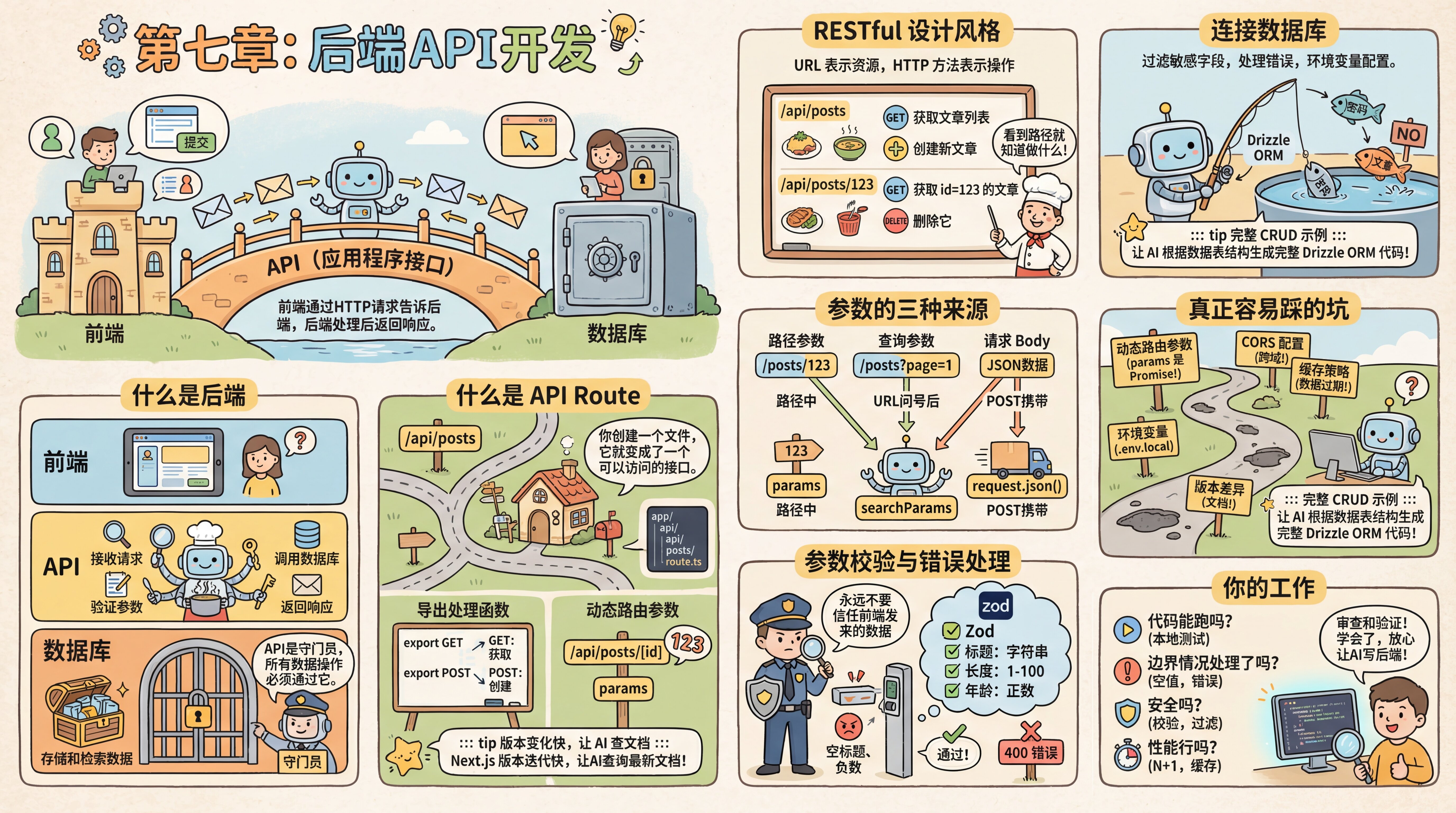
Introduction
You have the UI, and the database is ready too. When you click the "Submit" button, the data should be saved to the database—but there’s still a bridge missing between the frontend and the database.
That bridge is the API (Application Programming Interface). The frontend uses HTTP requests to tell the backend what the user wants, and the backend processes the request and returns a response.
What Is the Backend
You tried connecting directly to the database from the frontend, but the veteran developer stopped you—"Frontend code runs in the user's browser. If the frontend connects directly to the database, users can open F12 and see your database password, and even delete other people's data at will." That’s when you realized there has to be a "middleman" between the frontend and the database to enforce access control.
The backend is code that runs on the server and is responsible for handling requests from the frontend, interacting with the database, and executing business logic.
| Layer | Responsibility |
|---|---|
| Frontend | Display the UI, collect user input, send HTTP requests |
| API | Receive requests, validate parameters, query the database, return responses |
| Database | Store and retrieve data |
The frontend must not access the database directly—that would expose all data and make permission control impossible. The API is the database’s gatekeeper, and all data operations must go through it.
What Is an API Route
Now you understand why you need a backend, but how exactly do you write one? Do you need to set up an Express server yourself? The veteran developer says no—Next.js has built-in API Route support. Creating a file creates an endpoint, with no need to set up an extra server.
But before talking about API Route, let’s first understand a more fundamental concept: routing (Route).
Routing: The URL Determines What You See
You deal with routing every day—you just may not have realized it. Open your browser and look at the address bar:
- Visit
movie.douban.com/→ you see the Douban Movies homepage - Visit
movie.douban.com/subject/37311135/→ you see the details page for Pegasus 3 - Visit
movie.douban.com/subject/37311135/comments?status=P→ you see the short reviews for this movie (?status=Pmeans "reviews from people who have watched it") - Visit
movie.douban.com/chart→ you see the rankings page
Different URLs show different pages. That’s what routing is—the URL path determines what content is displayed. The part after ? is the query string, which is used to further filter or control what gets displayed.
In Next.js, this mapping is reflected directly in the file structure:
app/
├── page.tsx                    → yourdomain.com/
├── subject/
│   └── [id]/
│       ├── page.tsx            → yourdomain.com/subject/37311135
│       └── comments/
│           └── page.tsx        → yourdomain.com/subject/37311135/comments
└── chart/
    └── page.tsx                → yourdomain.com/chart
The folder structure is the URL structure. Create a file, and you get another page. [id] is a dynamic segment—whether it’s 37311135 or some other movie ID, it’s handled by the same page.tsx. This is Next.js file-system routing—you don’t need to write config files to define "which URL maps to which page." Wherever the file is, that’s what the URL is.
From Page Routes to API Routes
The routes above are for pages users view. API Route follows the same idea, except instead of returning a page, it returns data.
Create a route.ts file in the app/api/ directory, and you get a data endpoint:
app/api/movies/route.ts→yourdomain.com/api/movies(returns JSON data for the movie list)app/api/movies/[id]/route.ts→yourdomain.com/api/movies/123(returns JSON data for a specific movie)
The only difference is this: page.tsx returns a page users see, while route.ts returns data for programs to use.
Exporting Handler Functions
In a route.ts file, you export functions corresponding to HTTP methods. For example, export a GET function to handle GET requests, and export a POST function to handle POST requests.
Next.js automatically calls the matching function based on the request method. If you export both GET and POST, the same URL can support both fetching and creating operations.
Versions change fast—use AI to check the docs
Next.js releases updates quickly, and APIs may change. Ask AI to use Context7 to look up the latest documentation so the generated code matches the current version.
Before Talking to AI About the Backend, Learn a Few Keywords
Before jumping into 7.0, there are a few terms you’ll keep running into. You don’t need to memorize them—just get familiar with them. You’ll see each one again in concrete scenarios later.
RESTful—a naming convention for APIs. The core idea is to use URLs to represent resources and HTTP methods to represent actions. In fact, you already send HTTP requests every day—when you type a URL into the browser and press Enter, that’s a GET request; when you fill out a signup form and click submit, that’s a POST request. RESTful just applies this more systematically: GET /api/movies gets the movie list, POST /api/movies creates a new movie, and DELETE /api/movies/123 deletes the movie with id=123. You can tell what it does just by looking at the path. If you tell AI "use a RESTful style," it will automatically follow this convention.
Three sources of parameters—you’ve actually already seen the first two in the browser address bar:
- Path parameters: in
movie.douban.com/subject/37311135, the37311135is a path parameter that identifies "which movie I want to view" - Query parameters: in
movie.douban.com/subject/37311135/comments?status=P, the part after?tells the backend "only show reviews from people who have watched it" - Request Body: you can’t see this in the address bar—when you fill out a form and click "Submit," the form data (title, year, synopsis) is packaged as JSON and sent to the backend in the request body
Path parameters identify "which resource," query parameters control "how to query," and the Body carries "the data to create or modify."
searchParams: page=1Consistent response format—early in the project, agree with AI on a standard: return { success: true, data: ... } for success, and { success: false, error: { message: "..." } } for failure. This keeps frontend handling simple and consistent—check the success field first; if it’s true, use data; if it’s false, show the error message.
REST isn’t the only API style
Everything in this chapter uses RESTful APIs—URLs represent resources, and HTTP methods represent actions. This is the most common approach, and the one you’ll usually encounter first.
But you may run into AI-generated code that doesn’t have a route.ts file or URLs like GET /api/movies. Instead, you might see function calls like trpc.movie.list(). That means AI used tRPC—an approach that lets the frontend call backend endpoints as if they were local functions. The benefit is that types stay automatically in sync between frontend and backend: if the backend changes an interface signature, the frontend immediately gets a type error, so you don’t end up with problems like "the backend renamed a field and the frontend didn’t know."
You don’t need to specify which approach to use. If you tell AI "use a RESTful style," it will use REST. If you don’t specify, AI will choose based on the project context—so don’t be surprised if you see tRPC in the code. It solves the same problem as REST, just with a different style: enabling communication between the frontend and backend.
Your Job
You do not need to handwrite every endpoint in this process. You only need to tell AI what you want, and it will generate the complete code. Your job is to verify the results:
- Does it run? — Start with
pnpm dev, and make sure the page works as expected - Is the database correct? — Open Drizzle Studio and check whether the data was written correctly
- Are there errors? — Copy the entire terminal error output to AI and let it fix it
You don’t need to understand every line of code. It’s enough to know what each file is responsible for and, when something goes wrong, be able to tell AI "which file to change."
Chapter Sections
| Section | Content |
|---|---|
| 7.0 Get Your First Full-Stack App Working | Build a Todo app hands-on and experience the complete full-stack data flow |
| 7.1 One Endpoint Is No Longer Enough | Relational queries, pagination, filtering, and sorting—what to do when data volume and requirements grow |
| 7.2 When an Endpoint Breaks | Parameter validation, idempotency, and error handling—the first pitfalls after going live |
| 7.3 Making Endpoints Easier to Use | Versioning, API documentation, and batch operations—treating APIs like products and refining them |